

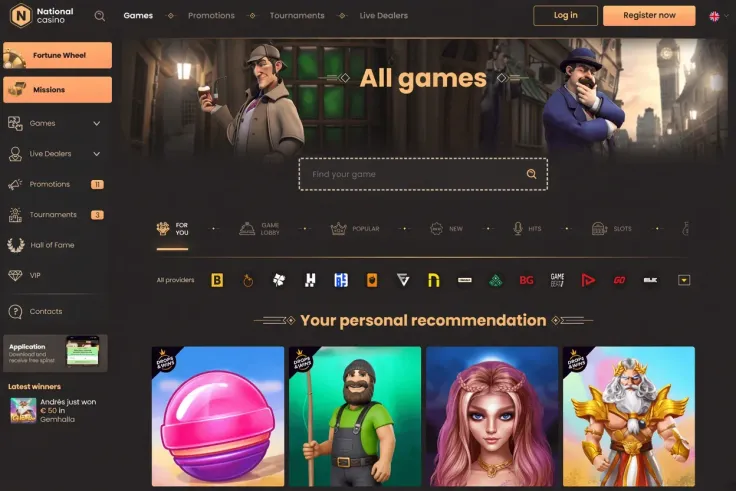
National Casino mobile means the mobile site: you open the casino in your phone's browser and play there. There is no iPhone app and no Android app, so nothing needs to be installed and no app store is involved.
That makes the choice simple. The phone version is the website itself, shown on a smaller screen, and it is the only mobile option for both iPhone and Android users. The sections below cover what to expect from it and how to keep your account secure on a phone.
What you get on the phone

Playing on mobile means using the same casino through a browser such as Safari or Chrome. You can log in with your existing account or sign up from the phone if you are new. Because it is a website rather than an app, it behaves like any other page: it loads when you open it, and it does not run in the background or send app notifications.
Compared with a desktop computer, the main differences come from the device, not from the casino:
- The screen is smaller, so game windows, menus and tables of text take more scrolling and tapping.
- You hold the phone in one hand, which makes accidental taps more likely, especially on buttons near a bet or confirm control.
- Portrait and landscape orientation can change how a game fits the screen, so try both before you start a session.
- Your connection can change as you move between Wi-Fi and mobile data, which affects how quickly games load.
Slots, table games and live dealer games are built to be played on screens of different sizes, and you can read how individual games work on the games page, the slots page or the live casino page. Before you play any game on a phone, open its rules or paytable and check how the features work. Small screens can hide details that are easy to see on a monitor.
Each spin or round is started by you. Results are random, and playing on a phone does not change them in any way. A game that looks different on a small screen pays exactly as it does on a large one.
If you prefer a bigger display for reading terms, checking limits or going through account settings, a computer or tablet is more comfortable. The account is the same either way, so you can use whichever device suits the task.
No app to install: how browser play works
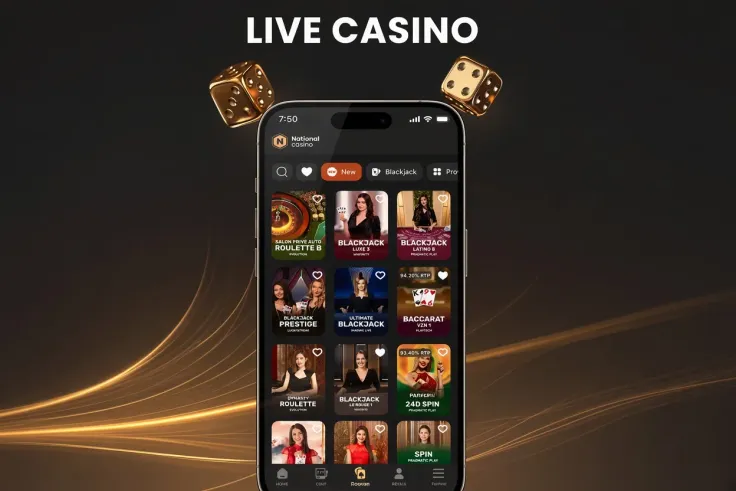
Since National Casino has no native app, there is nothing to find in the App Store or Google Play. If you search either store and see something using the casino's name, treat it as not connected to National Casino. The same goes for any website offering an app file to download. Never install apps from unknown sources: a fake app can capture your login details or put harmful software on your phone.
What you do instead is open the site in your browser, as shown in the steps above. A few points help in daily use:
- Use the browser that came with your phone, or one you already trust and keep updated. Updates fix security problems, and they matter more for a site where you enter payment details.
- Type the casino's address yourself or use a bookmark you saved on purpose, rather than following links in messages or emails. This protects you from copies of the site made to collect passwords.
- Add a shortcut to your home screen if you want one-tap access. It is only a link to the same website, not an installed app, so it takes up no meaningful space and it can be deleted any time.
- Let the browser keep the site open in its own tab, and close the tab when you finish instead of leaving it open in the background.
Browser play depends on your signal. If the connection drops during a round, reload the page and check your account before you do anything else. Your protection rests on your phone's screen lock and your account password, so both need to be strong.
Keeping your account secure on a phone

Your phone holds your account, so protect it as you would online banking.
- Screen lock. Use a passcode, fingerprint or face unlock, and set the phone to lock quickly when idle. If someone picks up your phone, the casino should not be one tap away.
- Do not share the device. If other people use your phone or tablet, do not let the browser save your casino password, and log out when you finish.
- Strong, unique password. Do not reuse a password from your email or banking. A password manager on the phone makes this easy.
- Public Wi-Fi. Avoid logging in or paying over open networks in cafés, stations or hotels. Your own mobile data connection is the safer choice for account activity.
- Mobile data. Streaming a live game uses more data than a spinning slot. If your plan is limited, check your usage, or play on Wi-Fi at home.
- Spotting fakes. Be wary of texts or emails claiming there is a problem with your account and asking you to log in through a link. Open the site yourself instead.
A phone is always with you, which makes it easy to open the casino at odd moments. Decide in advance how much time and money you are willing to spend, and use the account's own control tools, such as deposit limits or time-outs, if they are offered in your settings. The safer gambling page explains the options in more detail. If the casino's safeguards are not clear to you, contact its support before you deposit.
If you ever think someone else has accessed your account, change your password straight away and tell the casino's support team. Keep your phone's operating system and browser updated, and remove any unfamiliar apps or browser extensions you did not install yourself.